
Email Hosting: How to Choose a Secure Business Email Service
October 18, 2026
Email hosting gives you control over how your business sends, receives, stores, and protects messages using your own domain name. It can be bundled with website hosting, purchased as a dedicated service, or included in a productivity suite. The best option depends less on the cheapest mailbox price and more on how critical email is to your daily operations.
If customer inquiries, invoices, password resets, supplier requests, and internal communication rely on email, I recommend treating email hosting as core business infrastructure rather than a simple add on.
Table Of Contents
• Choosing The Right Email Hosting Model
• Security, Deliverability, And Reliability
• Planning A Safe Email Migration
How Email Hosting Works
Email hosting is a service that operates the systems used to send, receive, and store messages for a custom domain such as sales@yourcompany.sg. In practical terms, it provides mailboxes, message storage, login access, outgoing mail services, spam controls, and administrative settings for your organization.
GoCloud Singapore’s email hosting overview describes email hosting as custom domain sending, storage, and receiving with access through common protocols such as POP3, IMAP, and SMTP. Similarly, Exabytes Singapore’s business email hosting explanation describes it as a service that operates email servers for organizations using business domain mailboxes.
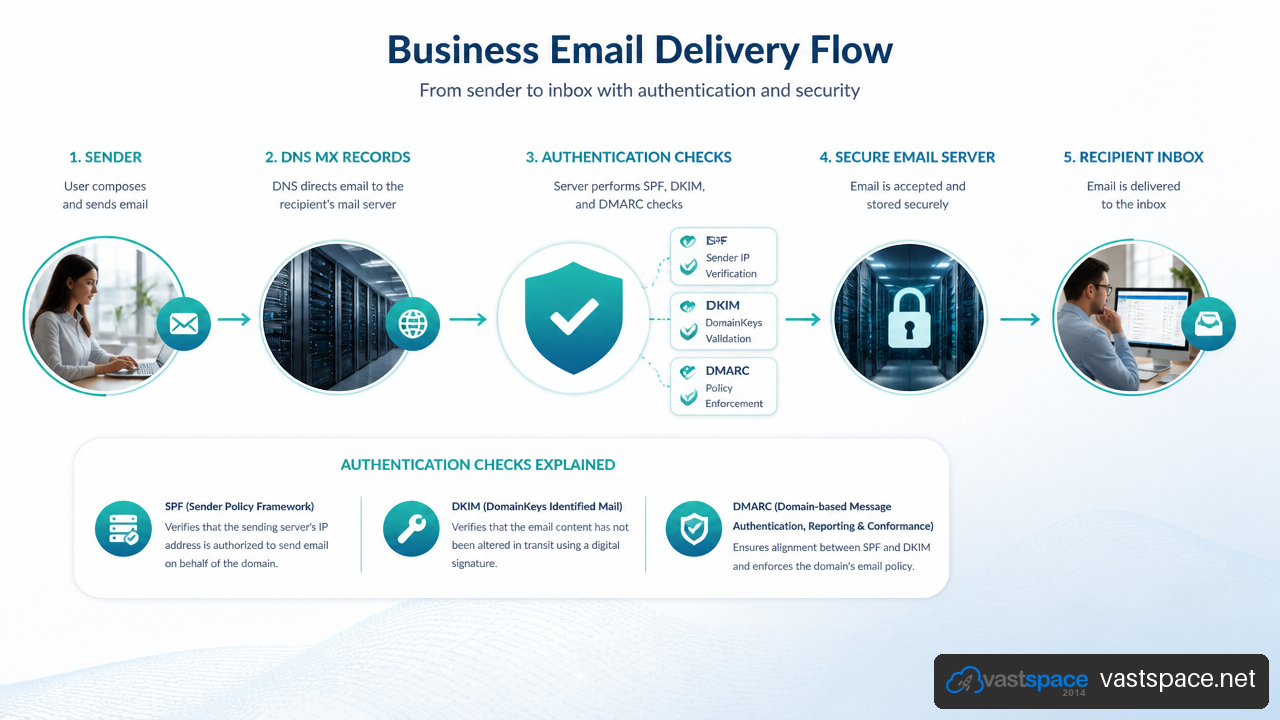
What Happens When Someone Emails Your Domain
A message does not go directly from one inbox to another. Several systems work together before it appears in your mailbox.
- The sender’s email server checks the domain after the
@symbol. - It looks up the domain’s MX records in DNS. MX means Mail Exchanger, and these records identify the server responsible for receiving mail.
- The sending server connects to the receiving mail server and attempts delivery using SMTP, the standard protocol for sending email.
- The receiving service checks the message for spam signals, malware, authentication results, mailbox capacity, and policy violations.
- If accepted, the message is stored in the recipient’s mailbox and becomes available in webmail, desktop software, or a mobile email app.
This chain matters because a delivery problem can occur at more than one point. A message may fail because MX records are wrong, the mailbox is full, authentication is missing, the sender’s IP address has a poor reputation, or the recipient’s spam filter applies a strict policy.
IMAP, POP3, And SMTP Explained
These protocols sound technical, but their differences affect how staff access and retain business email.
| Protocol | Main Purpose | Best Fit | Important Limitation |
|---|---|---|---|
| IMAP | Synchronizes messages between the server and devices | People using phones, laptops, webmail, and shared access | Requires ongoing server storage |
| POP3 | Downloads messages to a device | Simple single device setups with limited server storage | Can create inconsistent mailbox history across devices |
| SMTP | Sends outgoing messages | All standard email clients and applications | Does not provide mailbox synchronization by itself |
For most businesses, IMAP is the safer default because staff commonly switch between phones, webmail, and computers. When an employee reads or files a message on one IMAP connected device, the mailbox stays synchronized elsewhere.
POP3 can still work for narrow cases, such as an archive workstation that downloads messages locally. Fair warning: it can cause confusion if users expect sent mail, folders, and older messages to appear on every device.
Website Hosting And Email Hosting Are Not The Same Service
Website hosting stores website files, databases, images, and application code. Email hosting stores mailboxes and operates mail routing services. A single provider may supply both, but the services have different failure patterns.
For example, a website can experience a temporary traffic spike while email remains available through a separate service. The reverse is also true: a website may load normally while email delivery fails due to an authentication or reputation issue.
Bundling can be reasonable for a small organization with a modest website and a few mailboxes. Separating email becomes more attractive when messages support sales, legal records, payment workflows, customer service, or large outbound campaigns.
Choosing The Right Email Hosting Model
The right email hosting model depends on business risk, internal skills, budget, required collaboration tools, and expected growth. I would avoid choosing only by storage size or a headline monthly fee.
Shared Hosting Email
Shared hosting email is commonly included with web hosting plans. Multiple customers may share server resources and, in some cases, outbound sending infrastructure.
It can be a practical starting point when you have a small team, limited email volume, and straightforward mailbox needs. It is often easier to manage because domain, website, and email settings appear in one control panel.
The tradeoff is that shared infrastructure can create dependencies outside your control. If other users on a shared sending IP generate spam complaints, the IP reputation may suffer. That does not automatically mean every shared email service has poor delivery, but it is a risk worth asking about.
Specialist Email Hosting
A dedicated email hosting service focuses on business mailboxes, email security, storage, administration, and mail delivery. It may offer stronger mailbox controls, more focused support, larger storage options, and clearer email management tools than a basic web hosting bundle.
Choose this model when email is business critical but you do not need the full document collaboration ecosystem of a productivity suite. It can suit professional firms, retail businesses, agencies, startups, and organizations that want custom domain email without moving every file and workflow to another platform.
For readers considering a plan such as VirtuMail V2 from Vastspace, I suggest reviewing the mailbox count, storage allocation, spam filtering, backup process, support coverage, and domain administration responsibilities before subscribing. A plan is only a good fit if it covers normal operations and recovery needs, not just initial setup.
Productivity Suite Email
Google Workspace and Microsoft 365 combine business email with calendars, shared storage, meetings, collaboration tools, and identity management. They are often a better match for teams that already rely heavily on shared documents, video meetings, scheduling, or advanced access controls.
The tradeoff is cost and administration. Per user pricing may rise as teams grow, and migration may involve more than copying messages. Calendars, contacts, shared drives, permissions, aliases, and sign in policies may all need attention.
Dedicated Or Self Managed Mail Infrastructure
A dedicated server or self managed virtual server gives an organization more control over the mail environment. It can make sense for organizations with specialized compliance, integration, or operational requirements.
For most small and medium businesses, however, self managed mail is not automatically the better choice. It requires active patching, monitoring, anti abuse controls, backups, DNS expertise, incident response planning, and reputation management. A dedicated server does not guarantee inbox placement if authentication, sending behavior, or IP reputation is weak.
| Model | Good When | Avoid When | Main Risk To Manage |
|---|---|---|---|
| Shared hosting email | You need basic mailboxes and low complexity | Email outages would immediately disrupt operations | Shared resources and sending reputation |
| Specialist email hosting | You need business email without a broad collaboration suite | You require deep document and identity tools | Provider support, backups, and plan limits |
| Productivity suite | Teams need email, calendars, files, and meetings together | You only need a few simple mailboxes | Per user cost and migration complexity |
| Self managed infrastructure | You have technical capacity and specialized requirements | You cannot maintain security and mail operations | Security, abuse prevention, and recoverability |
Calculate The Full Cost, Not Just The Mailbox Fee
There is no reliable Singapore wide benchmark for total email hosting cost because providers package services differently. One plan may include migration help and spam filtering, while another charges separately for backups, priority support, archival storage, or extra mailboxes.
A practical cost model includes:
• Mailbox subscriptions and storage upgrades
• Domain name renewal and DNS management
• Migration labor and staff time
• Backup, retention, and restoration charges
• Spam filtering, security add ons, or email archiving
• Support plan costs and response expectations
• Training, mobile setup, and shared mailbox administration
Consider a ten person company moving from bundled website email to a separate service. The lowest monthly mailbox price may look attractive, but one missed alias, untested restore process, or day of staff setup can cost more than the price difference. The right comparison is annual operating cost plus the cost of disruption.
Security, Deliverability, And Reliability
Security and delivery are closely connected. A mailbox can have a strong password but still suffer if its domain lacks authentication records or if an attacker sends convincing spoofed messages using the company name.
Protect Mailboxes And Sensitive Messages
Start with basics that reduce common account takeover risks.
• Require long, unique passwords and multi factor authentication where available.
• Use SSL encryption for webmail and email client connections so credentials and message traffic are protected in transit.
• Limit administrator access to people who actually manage domains, billing, or mail settings.
• Review forwarding rules regularly because compromised accounts may forward messages silently to an external address.
• Confirm whether deleted messages can be restored, how long backups are retained, and who can request a restore.
Spam filtering and malware scanning also matter, but they are not perfect. A strong filter can block obvious junk while still allowing a convincing invoice fraud attempt through. Staff should verify unusual payment requests through a known phone number or trusted contact method.
SPF, DKIM, And DMARC Work Together
SPF, DKIM, and DMARC are DNS based controls that help receiving services evaluate whether a message genuinely represents your domain.
| Control | What It Does | Common Setup Mistake |
|---|---|---|
| SPF | Lists permitted services that can send mail for a domain | Publishing multiple SPF records instead of one combined record |
| DKIM | Adds a cryptographic signature to messages | Forgetting to publish or activate the matching DNS key |
| DMARC | Tells receivers how to handle failing mail and provides reporting | Enforcing policy before SPF and DKIM are working correctly |
SPF answers a basic question: is this sending system allowed to send for the domain? DKIM adds a signature that a recipient can validate. DMARC evaluates whether SPF or DKIM passes and aligns with the visible domain in the From address.
Google Workspace guidance for bulk senders states that senders exceeding 5,000 messages per day must configure SPF, DKIM, and DMARC. Even organizations below that threshold benefit from proper authentication because it supports anti spoofing and clearer delivery decisions.
Google’s DMARC setup guidance recommends configuring SPF and or DKIM before DMARC and allowing approximately 48 hours before enabling DMARC. Start with a monitoring policy rather than immediately asking recipients to reject failures. This gives you time to discover legitimate services, such as newsletter tools, website forms, accounting platforms, or help desk systems, that also send mail using your domain.
Diagnose Spam And Delivery Problems By Layer
Changing email hosts may help in some cases, but it is not a universal fix. A community discussion on reported shared hosting email delivery issues describes problems involving shared reputation, blacklists, and missing authentication records. These are practitioner reports rather than controlled tests, but they point to a useful diagnostic method: identify the failure layer before moving services.
- Check the rejection message. A hard bounce may name an authentication failure, blocked IP, nonexistent recipient, or recipient policy issue.
- Inspect DNS records. Confirm MX, SPF, DKIM, and DMARC entries are correct and do not conflict with older services.
- Review the sending source. Website forms, CRM tools, newsletters, and staff mailboxes may use different sending systems.
- Check message behavior. Sudden volume increases, repeated identical content, attachment heavy messages, or suspicious links can affect filtering.
- Test a small sample. Send normal business messages to different recipient providers and compare headers, spam placement, and bounce details.
A useful example is a company that changes its email provider but leaves a contact form configured to send through the old website server. Staff email may authenticate correctly while form notifications continue to fail SPF alignment. The problem is not necessarily the new mailbox host. It is the overlooked sending source.
Planning A Safe Email Migration
A successful mailbox migration is mostly preparation. Messages can continue flowing during a move, but only if you map the accounts, DNS records, and routing changes before the cutover.
Build A Mailbox Inventory Before Moving
Do not limit the inventory to named employee accounts. Include every address or service that sends or receives mail.
• Active user mailboxes and former employee archives
• Shared mailboxes such as support@, accounts@, and sales@
• Aliases, mailing groups, catch all rules, and forwarding addresses
• Mobile devices, desktop clients, scanners, printers, website forms, and CRM tools
• Calendars, contacts, signatures, auto replies, retention rules, and delegated access
A missed shared mailbox is a common operational failure. For example, a company may migrate all employee inboxes successfully but forget that supplier invoices arrive at accounts@. The messages may then route to an old mailbox no one monitors.
Use A Controlled DNS Cutover
DNS propagation means DNS changes can become visible at different times depending on resolver caching. The exact timing varies, so avoid assuming a change is instant everywhere.
A safer cutover sequence looks like this:
- Reduce DNS TTL values in advance if your provider allows it. Do this before the migration window, not during it.
- Create destination mailboxes, aliases, security settings, and required authentication records.
- Copy historical mail using the migration tool or IMAP process supported by the destination service.
- Test sign in, sending, receiving, shared mailboxes, mobile access, and calendar access with pilot users.
- Update MX records to route new incoming mail to the new provider.
- Monitor both old and new systems during the transition for late arriving messages or routing errors.
- Keep the old service available until mailbox counts, folder history, delivery tests, and critical integrations are verified.
Validate Recovery, Not Just Delivery
Many migrations look successful because new messages arrive. That is only the first test. I recommend validating recovery as well.
| Validation Area | What To Test | Why It Matters |
|---|---|---|
| Historical mail | Older folders, sent messages, attachments, and search results | Missing history may only be noticed during a dispute or audit |
| Shared addresses | Delivery to groups, aliases, and departmental mailboxes | These addresses often support customer facing workflows |
| Client access | Webmail, phone, desktop software, and SMTP sending | Incorrect client settings can interrupt individual staff members |
| Security | Multi factor access, spam filtering, and account recovery | Weak controls can create risk immediately after migration |
| Restore process | A test restore of a deleted message or folder | Backup claims are less useful if restoration is unclear or slow |
For Singapore based buyers, it is also sensible to ask where support is delivered, whether data location can be specified, what recovery commitments appear in the contract, and who is responsible for DNS administration. Local support can be useful, but it should not replace written clarity about incident handling and account ownership.
Key Takeaways
• Email hosting is the system behind custom domain mailboxes, message storage, incoming routing, outgoing SMTP delivery, and user access.
• Shared hosting email can be suitable for simple needs, while specialist email hosting or productivity suites often fit organizations with higher reliability and collaboration requirements.
• Choose based on full operating cost, including migration work, backups, support, storage, security, and administration.
• SPF, DKIM, and DMARC should be planned together. DMARC works best after SPF and or DKIM are configured and observed.
• A provider change alone may not solve deliverability problems. Check DNS, sender authentication, reputation, website forms, and recipient error messages first.
• A migration should include mailboxes, aliases, forwarding rules, calendars, clients, shared addresses, historical mail, and recovery testing.
Email Hosting FAQ
What Is Email Hosting?
Email hosting is a service that runs business mailboxes for a domain you control. It handles receiving, storing, accessing, filtering, and sending email through services such as IMAP, POP3, SMTP, webmail, and mobile email apps.
Do I Need Email Hosting If I Already Have Website Hosting?
Possibly. Some website hosting plans include email mailboxes, which can be enough for basic use. Choose separate email hosting when email is essential to sales, customer support, financial processes, or operational continuity and you want email administration separate from website resources.
Should I Use IMAP Or POP3?
Use IMAP for most business situations because it keeps messages synchronized across devices. Use POP3 only when you specifically want messages downloaded to a single device and understand the limits around synchronization and server retention.
How Much Mailbox Storage Does A Small Business Need?
It depends on attachments, retention needs, and whether staff store large files in email. A text heavy mailbox may use little storage, while accounting, design, and legal teams can consume space quickly. Review current mailbox usage before choosing a plan and leave room for growth rather than buying only for today’s usage.
Why Are My Business Emails Going To Spam?
Common causes include missing SPF, DKIM, or DMARC records, poor sending IP reputation, suspicious message content, sudden increases in sending volume, and recipient specific filtering rules. Review bounce messages and message headers before assuming the mailbox provider is the cause.
Can I Move Email Hosting Without Losing Old Messages?
Yes, if the migration is planned properly. Copy historical mail before the DNS cutover, keep the old service active for verification, and test folders, attachments, sent items, shared mailboxes, aliases, and mobile clients after the move.
Is Singapore Based Email Hosting Necessary?
Not always. The right choice depends on support expectations, data location preferences, latency needs, service terms, and the tools your team uses. Rather than assuming local infrastructure is automatically better, ask the provider where services operate, how support is handled, and what recovery commitments are documented.