
DDoS Protection on VPS: How to Keep Services Reachable
October 27, 2026
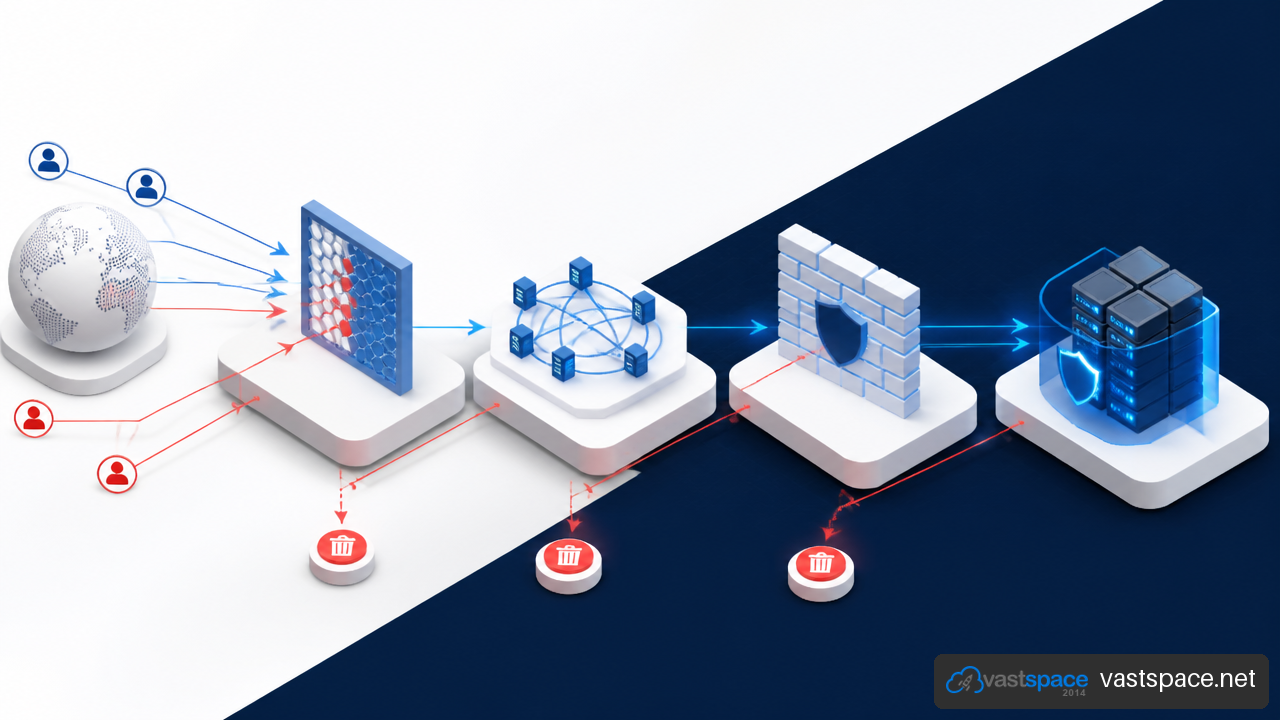
DDoS protection on VPS is not one feature that solves every attack. A protected VPS can filter some malicious traffic before it reaches your server, but your website, API, game server, or remote access service can still fail if the wrong layer is left exposed. I recommend treating DDoS defense as a chain: provider mitigation protects the network path, while your VPS configuration protects the operating system and application.
Table Of Contents
• What DDoS Protection On A VPS Actually Covers
• Build A Layered Defense Around The VPS
• Respond To An Attack Without Making Things Worse
• Choose A DDoS Protected VPS With The Right Questions
• Frequently Asked Questions
• Sources And References
Key Takeaways
The practical rule is simple: if an attack can fill the network connection before traffic reaches your VPS, protection must happen upstream. If the traffic reaches the VPS but abuses a service, local controls and application defenses must take over.
• Provider level filtering is essential for large Layer 3 and Layer 4 attacks that target bandwidth or connection capacity.
• A CDN, reverse proxy, and WAF are usually better suited to HTTP request floods than a host firewall alone.
• A firewall should expose only necessary ports, but it cannot absorb a traffic flood that has already saturated the upstream link.
• Included protection is not the same as guaranteed uninterrupted availability. Review filtering scope, escalation procedures, and null routing policies before buying.
• Keep the VPS origin IP private when using a CDN or reverse proxy. A publicly exposed origin can let attackers bypass those services.
What DDoS Protection On A VPS Actually Covers
A distributed denial of service attack uses many sources to exhaust a target resource. That resource may be network bandwidth, the number of open connections, CPU time, memory, web server workers, or database capacity. The attack does not need to break into the server. It only needs to make legitimate use too slow or impossible.
The Difference Between Network And Application Attacks
A VPS is vulnerable at several points. The location of the bottleneck determines which defense can help.
| Attack Type | Typical Target | What Happens | First Line Of Defense |
|---|---|---|---|
| Layer 3 flood | IP network capacity | Incoming traffic fills available bandwidth | Provider edge filtering or scrubbing |
| Layer 4 SYN or UDP flood | TCP or UDP resources | Connection tables, packet processing, or service ports become overloaded | Upstream filtering plus host limits |
| Layer 7 HTTP flood | Web application resources | Requests consume web workers, CPU, cache, or database capacity | CDN, reverse proxy, WAF, and rate limiting |
A UDP flood can be damaging even when no application is running on the targeted UDP port. Processing and rejecting a very large volume of packets still consumes network and system resources. A SYN flood works differently: attackers send TCP connection requests without completing the connection process, aiming to fill the queue used for pending connections.
An HTTP flood can look more ordinary. Instead of sending obvious junk packets, an attacker may repeatedly request expensive pages, search endpoints, login forms, or uncached API calls. The VPS can remain reachable by ping while its website becomes unusable because web workers or database connections are exhausted. That is the difference between network availability and application availability.
Why Provider Mitigation And VPS Capacity Are Different
A VPS has finite network capacity. Once inbound traffic fills the available path, a firewall rule inside the VPS is too late. The packets have already consumed the connection needed by real visitors.
Provider level DDoS mitigation acts earlier. It typically analyzes traffic patterns in the provider network, filters suspicious traffic, and forwards permitted traffic to the VPS. This is where scrubbing systems are useful: they attempt to separate attack traffic from legitimate traffic before the traffic reaches the virtual server.
That distinction matters during purchasing decisions. A host firewall can reduce abuse against SSH, HTTP, or exposed services. It cannot independently solve a volumetric attack that overwhelms the upstream network. I would view local controls as a second line of defense, not a substitute for provider filtering.
Filtering Is Not A Promise Of Zero Downtime
The phrase DDoS protected VPS often sounds absolute. In practice, protection depends on the attack type, its size, detection behavior, the filtering rules, and the provider response process.
Papaki’s explanation of VPS DDoS protection notes that moderate attacks may be filtered, while very large attacks may result in temporary null routing of the VPS IP address. Null routing, also called blackholing, discards traffic destined for the targeted IP. It can protect the wider provider network, but it also blocks legitimate visitors.
In plain terms, a null routed VPS is temporarily unreachable from the Internet. Your server may still be running, but its public IP is effectively cut off until routing is restored. That trade off should be part of every availability plan.
Build A Layered Defense Around The VPS
A strong setup gives each control a specific job. Do not expect one tool to protect every service, protocol, and failure mode.
Start With A Minimal Public Attack Surface
The safest open port is the one you do not need. Begin by listing every Internet facing service on the VPS: web traffic, email, SSH, APIs, game services, databases, monitoring agents, and control panels.
Use a host firewall to allow only expected traffic. For many web servers, that means allowing HTTP and HTTPS publicly while limiting SSH to trusted IP addresses, a VPN, or a bastion host. Database ports should generally not be open to the public Internet when the database is only used by applications on the same private network.
Interspace’s cloud server security guidance draws an important line: network level protection can filter traffic before it reaches a virtual server, but customers still need to configure operating system firewall rules. Provider controls reduce upstream attack traffic; they do not automatically secure every service you expose.
Protect HTTP Services With A Proxy And WAF
For websites and web APIs, place a CDN or reverse proxy in front of the VPS when it fits the application. The proxy receives public traffic and forwards only allowed requests to the origin server. A CDN can also cache static assets such as images, stylesheets, and JavaScript, reducing the direct load on the VPS.
A web application firewall, or WAF, evaluates HTTP requests. It can apply rules based on paths, headers, request methods, bot behavior, and known attack patterns. This is useful when an HTTP flood uses valid looking requests that network filtering may not identify as malicious.
Liquid Web’s overview of DDoS protected VPS services describes a layered approach that may combine network filtering with CDNs, WAFs, firewalls, and rate limiting. That combination reflects the core issue: a network filter may stop a packet flood, while an application layer control is needed for abusive but valid HTTP requests.
Fair warning: a CDN only protects traffic that actually goes through it. If your origin IP remains public, attackers can send traffic directly to the VPS and bypass the proxy.
Lock Down The Origin IP
After adding a CDN or reverse proxy, configure the VPS firewall to accept web traffic only from that proxy’s published IP ranges where possible. This makes direct access to the origin harder.
Origin exposure can happen in less obvious ways:
• An old DNS record still points to the VPS address.
• A mail server, development subdomain, or direct IP URL reveals the same origin.
• Outbound emails include headers or links that expose infrastructure details.
• A staging site runs on the same VPS but is not routed through the proxy.
Consider a company site using a CDN for its public homepage while leaving api.example.com pointed directly to the VPS. An attacker does not need to defeat the CDN. They can simply flood the direct API address. Protecting the main domain but exposing a related service can leave the same server vulnerable.
Apply Rate Limits Where Requests Become Expensive
Rate limiting sets a ceiling on how often a client can make requests or establish connections. It should be applied close to the service being protected.
For example, Nginx can limit requests to a login endpoint, API route, or dynamic search page. Connection limits can cap simultaneous connections from an IP address. SSH can use separate connection rate controls and automated temporary bans for repeated failed logins.
Avoid copying fixed values from another website. A public API used by mobile applications may naturally receive bursts from shared carrier IP addresses. A strict per IP limit could block real users. Start with baseline traffic data, identify expensive routes, and test limits before an incident.
For TCP services, enabling SYN cookies can help reduce dependence on a finite backlog of half open connections during a SYN flood. This is useful local hardening, but it does not replace upstream mitigation if the incoming packet volume overwhelms the network link.
Respond To An Attack Without Making Things Worse
During an attack, speed matters, but random changes can block legitimate traffic or erase useful evidence. Use monitoring to identify which resource is failing before changing controls.
Confirm The Actual Bottleneck
Check traffic graphs, active network connections, CPU load, memory pressure, web server status, response times, error rates, and database connection counts. The pattern tells you where to act.
| Symptom | Likely Pressure Point | Useful Immediate Action |
|---|---|---|
| Network graph is pinned and all services fail | Upstream bandwidth | Contact provider and confirm mitigation status |
| Many incomplete TCP connections | Connection exhaustion or SYN flood | Check SYN cookie settings and provider filtering |
| CPU spikes with repeated page requests | HTTP flood or expensive endpoint abuse | Enable proxy rules and tighten route specific limits |
| Website fails but SSH remains stable | Application or database exhaustion | Inspect worker queues, logs, caches, and database limits |
Do not assume high CPU always means a DDoS attack. A slow database query, broken crawler rule, marketing campaign, or application bug can produce similar symptoms. Review access logs and request patterns before applying broad blocks.
Escalate Before The Situation Becomes An Isolation Event
If provider level mitigation is included, contact support as soon as there is clear service impact. Provide the affected IP address, start time, protocols, ports, current symptoms, and any traffic evidence you have. Ask whether mitigation is active, whether traffic is being filtered upstream, and whether a null route is being considered.
This is especially important because some automated systems focus on large or clearly disruptive attacks. TransIP’s description of automated VPS protection states that smaller or low bandwidth attacks may pass through and still affect VPS performance. A low volume attack against an expensive PHP route, for example, may not resemble a massive bandwidth flood but can still make a small application unusable.
Preserve Access And Recover In Stages
Keep an out of band path for administration when possible, such as a provider console. If SSH is publicly open, an attack or an overly strict firewall rule can lock you out at the worst time.
Use this response sequence:
- Confirm the affected layer using provider graphs, host metrics, and application logs.
- Preserve administrative access through a console, private network, VPN, or approved management IP.
- Apply the narrowest effective change, such as a route specific rate limit or firewall restriction.
- Escalate upstream when bandwidth or packet volume is beyond VPS local capacity.
- Review logs after service stabilizes, then remove temporary blocks only after checking their effect.
A recovery plan should also include backups, tested restore steps, and a documented DNS or proxy configuration. DDoS mitigation protects availability; it does not repair damage caused by a rushed configuration change during an incident.
Choose A DDoS Protected VPS With The Right Questions
A provider’s marketing label is only the starting point. The useful question is not “Does this VPS include DDoS protection?” It is “What attack traffic is filtered, where is it filtered, and what happens when filtering is not enough?”
Questions To Ask Before You Buy
Ask providers for clear answers to these points:
- Which layers are covered: Layer 3, Layer 4, Layer 7, or only selected protocols?
- Is mitigation always active, automatically triggered, or manually enabled after an alert?
- What is the provider’s policy for null routing, blackholing, or IP isolation?
- Can customers view attack alerts, traffic graphs, or filtered traffic information?
- How is provider escalation handled during an active incident?
- Are there protected network options for non HTTP services such as SSH, game servers, VPNs, or custom TCP and UDP applications?
- Can the VPS use a CDN or reverse proxy without exposing its origin IP?
Exact thresholds and response times are not always published, so ask for the practical policy rather than relying on broad terms such as “always on.” For example, a provider may filter a common UDP flood automatically but isolate an IP that receives traffic beyond its available capacity.
Match The Protection To The Service
A simple brochure site and a public game server have very different needs. A cached website may benefit strongly from a CDN and WAF. A custom UDP service cannot use a standard HTTP CDN in the same way, so it needs provider protection that supports its protocol.
| Service Type | Priority Defense | Common Gap To Check |
|---|---|---|
| Business website | CDN, WAF, origin firewall rules | Exposed origin IP |
| Public API | Reverse proxy, route limits, authentication | Expensive endpoints and shared IP users |
| SSH administration | Firewall allowlists, VPN, connection limits | Public access from all IP addresses |
| Game or UDP service | Upstream UDP capable mitigation | CDN does not proxy the service |
| Email or custom TCP service | Provider filtering and strict service controls | Unexpected port exposure |
Plan For The Failure Mode You Can Accept
Some businesses can tolerate a temporary IP change or brief service interruption. Others cannot, particularly if the VPS hosts payment flows, customer portals, or time sensitive operations. Decide in advance whether the fallback is a secondary environment, a proxy service, a replacement IP, a static maintenance page, or a managed escalation path.
There is no universal proof that one DDoS protected VPS package will outperform another for every attack. Provider capacities, filtering rules, and incident procedures vary, and independent comparisons are limited. The practical decision is to choose transparent controls, test the architecture you can test, and avoid placing all protection responsibility on the VPS itself.
Frequently Asked Questions
Is Built In DDoS Protection Enough For A Website?
Usually not by itself. Provider filtering is important for network floods, but a website also needs application controls. Use a CDN or reverse proxy for public HTTP traffic, a WAF for suspicious web requests, rate limits for expensive paths, and firewall rules that prevent direct origin access.
Can A Firewall Stop A DDoS Attack On A VPS?
A firewall can block unwanted ports, protocols, and known abusive sources. It is useful against smaller attacks that reach the VPS. It cannot stop an attack that saturates the provider connection before packets arrive at the server. That requires upstream mitigation.
Can A VPS Survive A SYN Flood?
It may survive a limited SYN flood if upstream filtering, host firewall rules, connection controls, and SYN cookies are in place. The outcome depends on packet volume and available network capacity. If the upstream link fills, local TCP settings cannot restore access for legitimate users.
Can A VPS Survive An HTTP Flood?
Sometimes, but HTTP floods are often application specific. A small number of requests to a costly search, login, or report endpoint may consume more resources than many requests for a cached page. Use route level rate limits, caching, WAF rules, and a reverse proxy rather than relying only on network filtering.
What Does Null Routing Mean For A VPS?
Null routing discards traffic destined for an attacked IP address. It can protect surrounding infrastructure from an overwhelming attack, but your legitimate visitors cannot reach that IP while the route is active. It is a containment measure, not normal service availability.
Does A CDN Protect SSH, Game Servers, Or Other Non HTTP Services?
A typical web CDN protects proxied HTTP and HTTPS traffic. It does not automatically protect SSH, game servers, custom TCP services, or UDP services. Those services need firewall restrictions and provider or specialist protection that explicitly supports their protocols.
How Can I Verify That DDoS Protection Is Active?
Review the provider documentation, service plan, control panel, and support process. Confirm which IPs and protocols are covered, whether filtering is automatic, and what alerts are available. During routine operations, validate that your CDN or proxy is receiving public web traffic and that the VPS firewall rejects direct origin traffic where appropriate.